
Windows updates have a bad reputation. Most people picture the same thing: a machine that reboots itself halfway through a piece of work, or the update that lands on a Friday and breaks something by Monday.
That reputation is fair. Left alone, PCs update whenever they like. Multiply that across a company and you get chaos.
It doesn’t have to be that way. Managed properly, updates should be something nobody in the business even notices. Here’s what good looks like.
Test before you trust
The biggest mistake is pushing every update to every machine the moment Microsoft releases it.
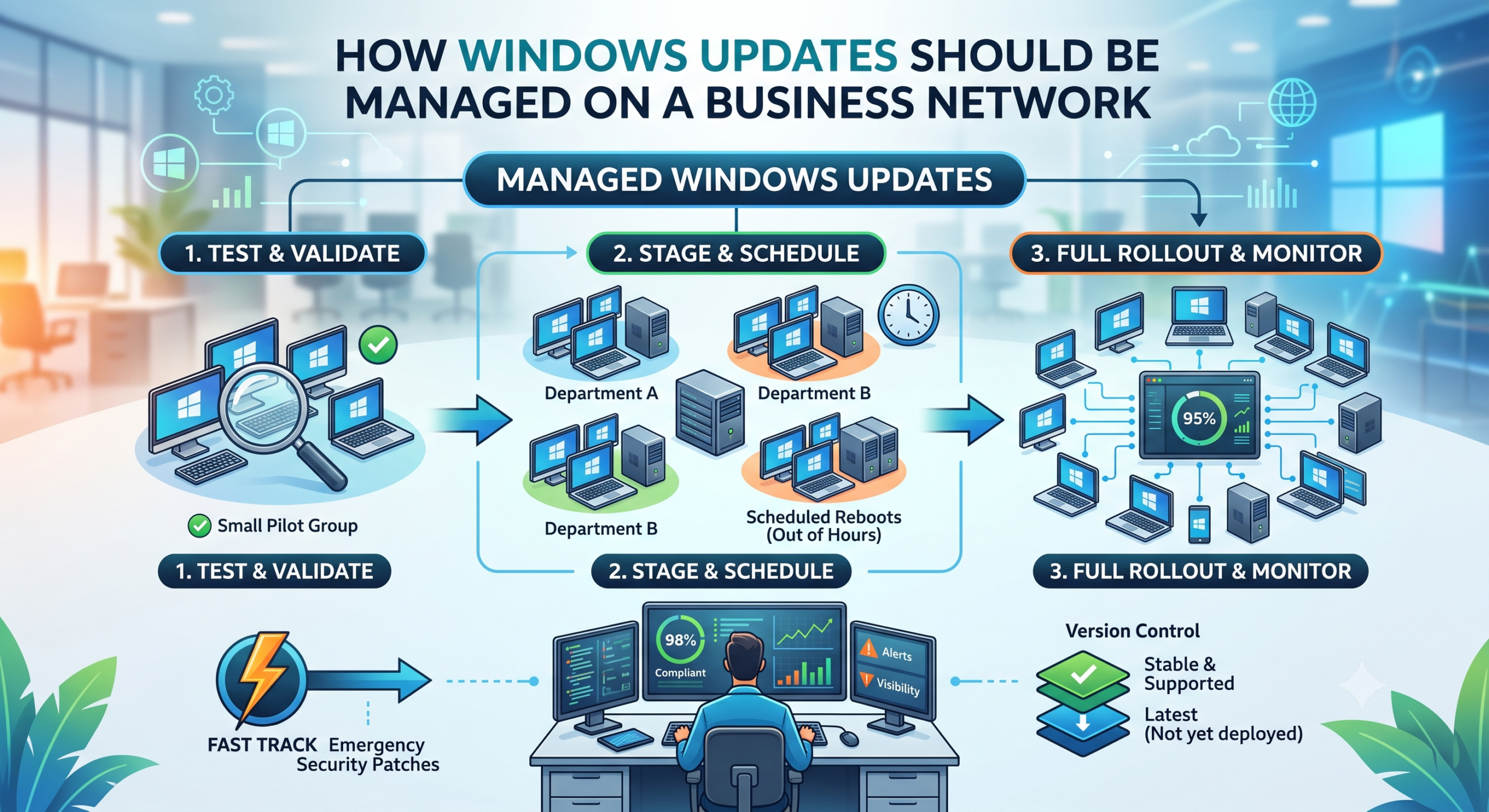
A better approach is to stage it. Give the update to a small group of machines first, then watch them for a few days. If those are happy, roll it out to everyone else.
The reason is simple. Bad updates happen, more often than Microsoft would like. If one slips through, you want a couple of machines affected, not the whole company. Staging means you catch it early and stop it before it spreads.
Think of it as tasting the food before it goes out to the whole table.
Schedule updates around people, not over them
Nobody should get a reboot in the middle of a meeting.
Updates should install and machines restart outside working hours. The work happens quietly in the background and the team gets on with their day.
Set a deadline too. Without one, people click “remind me later” indefinitely and end up months behind. That gap is exactly where attackers get in.
Stay on a version that works
Every so often Microsoft releases a big new version of Windows. Those early releases are usually where the teething problems live.
Machines shouldn’t leap onto the newest version the day it arrives. Keep the whole business on a stable, supported version, and move up once it’s proven itself. Just don’t leave it so long that you fall out of support and stop getting security fixes. That balance matters.
Keep a fast lane for serious threats
The careful, staged approach is right for routine updates. It’s the wrong approach for an emergency.
When a serious security flaw appears, and one that’s actively being exploited, you need to push the fix out straight away. No staging, no deferral. Good update management has both speeds built in.
Measure it, don’t assume it
The part most people skip is checking whether any of it actually worked.
You need visibility. Something that tells you which machines are up to date and which are lagging. If a machine is stuck, you chase it. Assuming everything’s fine because you set a policy once is how estates quietly drift out of date.
Scale it to the size of the business
A large estate can afford several staged groups. A small office of a few PCs can’t, and doesn’t need to.
For a handful of machines, keep it simple. Update everyone together after a short safety delay. There’s no point building a test group when there aren’t enough machines to have one.
Match the approach to the size of the business, not the other way round.
The goal behind all of it is the same. Machines that stay secure and current, with a team that barely notices it happening. If your updates don’t feel like that today, they’re worth a second look.
Leave a Reply